
Set up any grading system
MarkBook has no country mode, and it does not need one. Every school grading system in the world is a mix of a few patterns: whole-number marks, a scale where 1 is the best mark, words instead of marks in the first years, a written description only, a wide range of points or a percentage, letters, and a school's own choice. This page gives one recipe for each pattern, with the screens you will see. The building blocks are explained on Choosing a Grading System. Find your country on Find Your Country, see which patterns it uses for each school year, then follow the recipes here.
You need the Configuration permissions for scales, columns and templates. A manager has all of them.
Before you start: the year and its periods
Configuration → School year → Reporting periods
Make the periods your country uses: two semesters (most of Central and Eastern Europe), three terms or trimesters (France, Spain, the UK), four quarters (many US schools), or one school year with no periods (Romania since 2024, where only an annual average is closed). A term with checkpoints gets its marks on the checkpoints. See Terms & Checkpoints.
One period or several
A formula reads the columns of one period. If your country closes a result in each period and then an annual result, make one column per period and an annual column in the Final period zone. If it closes only an annual result, use one period for the whole year.
Where the columns go
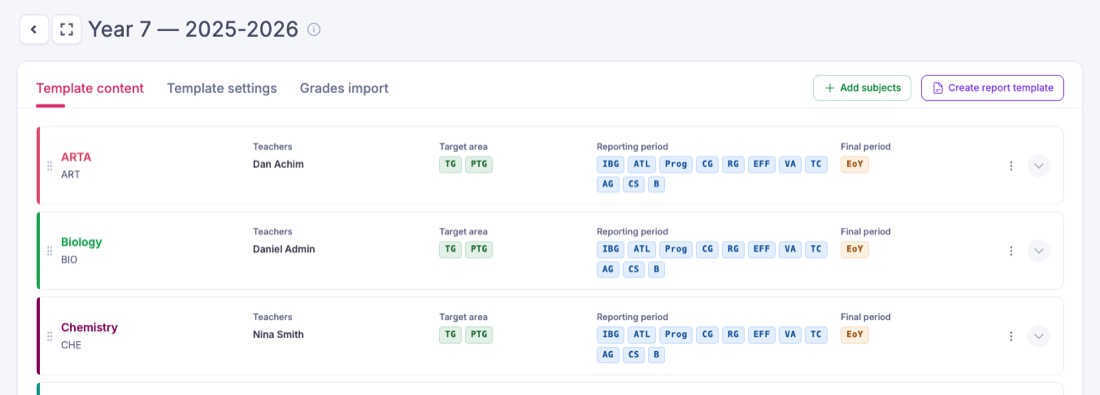
Every recipe ends the same way: the columns you create go on a markbook template, and the template decides which subjects show them. Configuration → Assessment → Markbook Templates, open a template. The Template content tab lists its subjects and the columns each one shows in each zone.
Whole-number marks, higher is better
For: Romania and Moldova 1–10, Bulgaria 2–6, Poland 1–6, Hungary, Serbia, Croatia, Slovenia, Estonia 1–5, Switzerland and Norway 1–6, Italy, Latvia and Lithuania 1–10, Finland 4–10, Ukraine 1–12, the IB 1–7, Germany's upper school 0–15 points.
- Configuration → Assessment → Attainment scales. Create a scale, choose Label marks, and add one grade per mark.
- Give each grade a Weight (points) equal to the mark: grade
7weighs 7. Averages are worked out from the weight, so this makes MarkBook's average the official average.
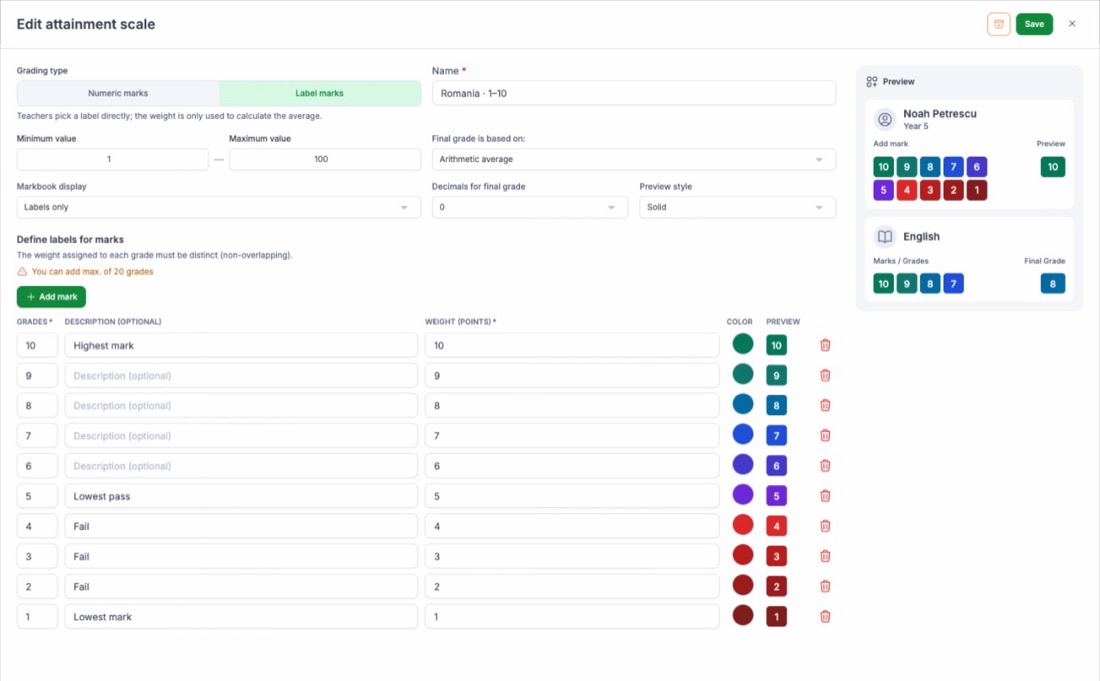 3. Put the local word in Description where your country has one (Bulgaria:
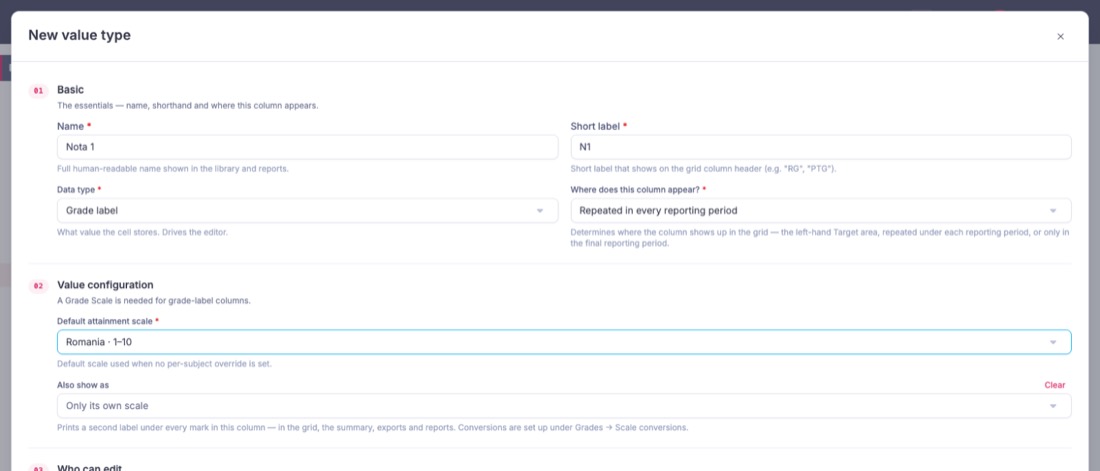
6 Отличен, 2 Слаб). 4. In Columns Configurations, press New value type for each mark a teacher gives in a period: Data type Grade label, your scale, Repeated in every reporting period. Short labels N1, N2 … keep formulas short.
 5. Add a Calculated column for the period average, for example
round(avg(N1, N2, N3, N4)) for a whole-number result, or round(avg(N1, N2, N3, N4), 2) for two decimals.
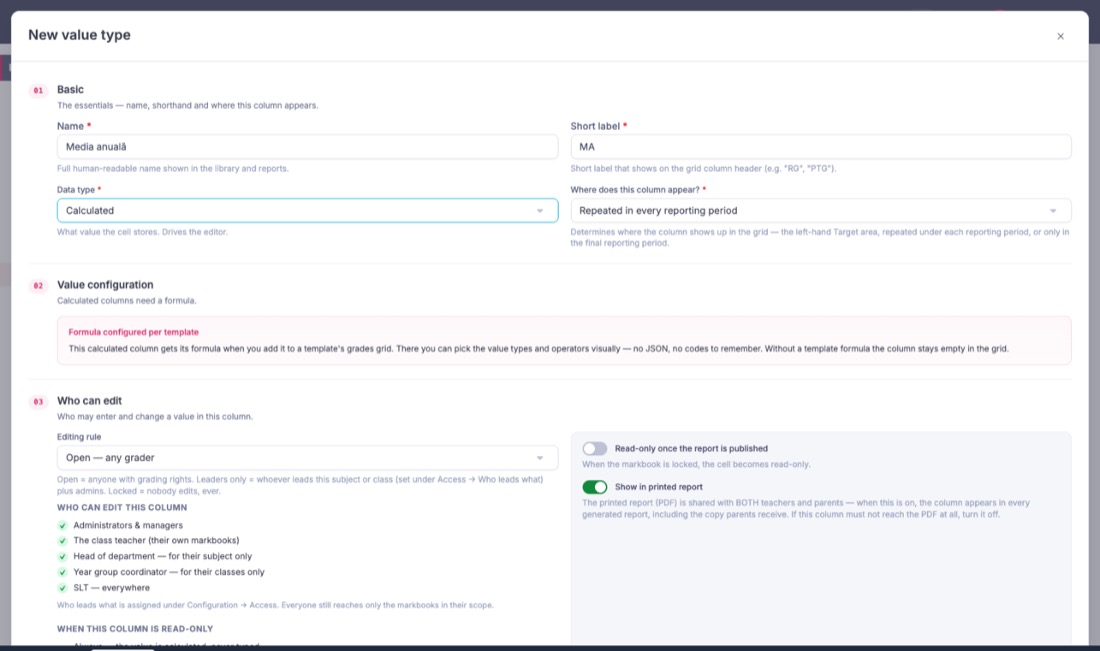
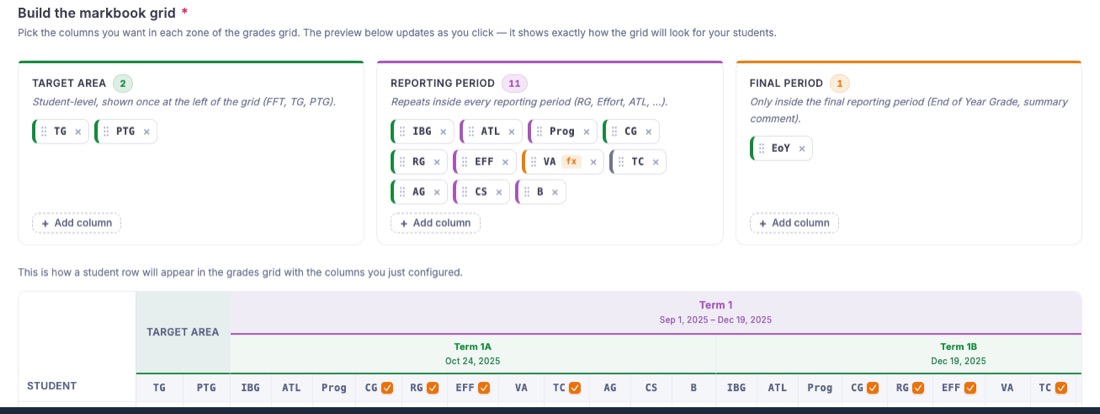
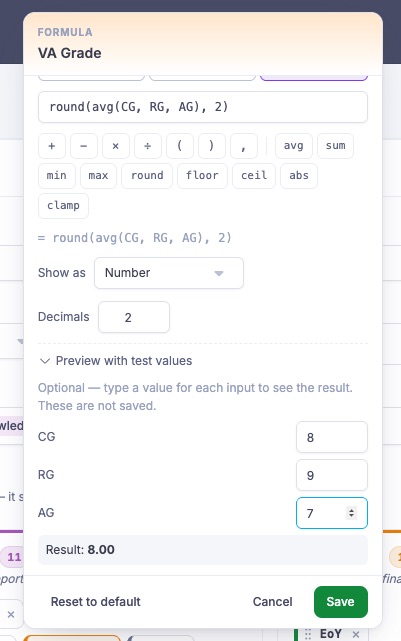
Then open the template's Template settings tab. In Build the markbook grid, press Add column in the Reporting period zone for each mark column and the average. Click the average (it carries an fx badge), open the Advanced tab and type the formula. Preview with test values shows the result before you save.
| Rounding rule in your country | Formula |
|---|---|
| Round to the nearest whole mark, .50 up | round(avg(...)) |
| Keep two decimals | round(avg(...), 2) |
| Cut, never round up | floor(avg(...)) |
Modifiers. A + or − beside a mark (Poland 4+, Czechia 1−) is a grade of its own. Add 4+ with weight 4.5 or 4.25, as your school counts it. Half marks (Switzerland 5.5) are the same: a grade 5.5 with weight 5.5. A scale holds at most 20 grades, so a 1–6 scale with + and − fits, but a 1–10 scale with every half mark does not.
Example. A Bulgarian pupil has 5, 6, 5 and 4 in a term. round(avg(N1, N2, N3, N4), 2) gives 5.00, which Bulgaria reads as Много добър.
A scale where 1 is the best mark
For: Czechia, Slovakia, Austria 1–5, Germany 1–6 (years 2/3 to 10), Ireland's Leaving Certificate H1–H8.
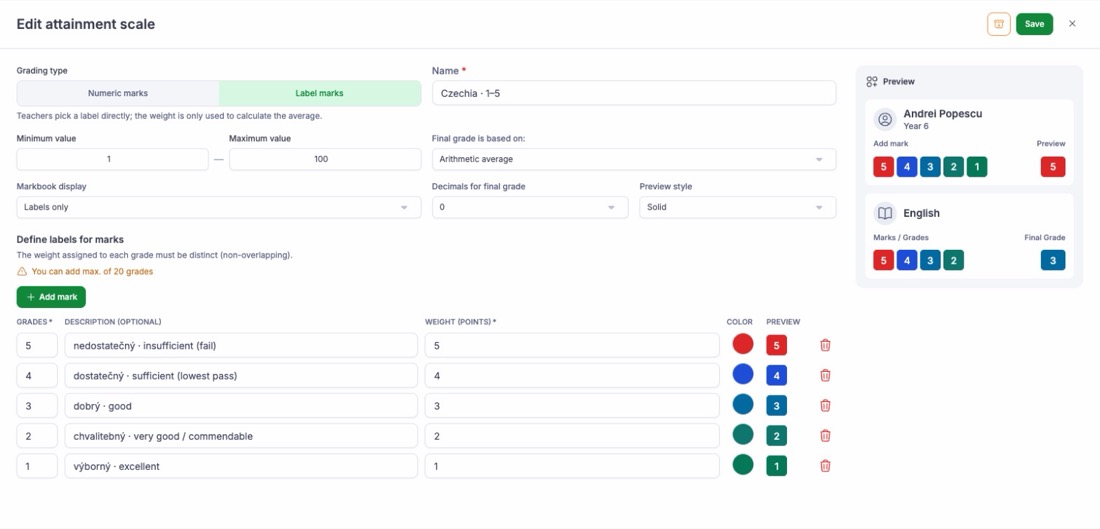
Build it like the scale above, with weight equal to the mark: 1 weighs 1, 5 weighs 5. The average is then the plain mean of the marks, as teachers work it out, and a lower average is a better one. Three things work the other way round:
- Sorting. A column sorted from high to low puts the weakest pupils first. Sort from low to high to see the best first.
- Colours. In Colour-code this column by its value, the green band is the low one: for a Czech average, From empty Up to 2.5 in green, From 4.5 Up to empty in red.
- Pass mark. The fail mark is the highest number (Czechia
5nedostatečný, Germany5and6).
German upper school
In the last two or three years of the German Gymnasium the scale changes to 0–15 points, 15 best. Use a second scale and the recipe for whole-number marks, higher is better.
Words instead of marks in the first years
For: Romania years 1–4 (Foarte bine, Bine, Suficient, Insuficient), Moldova years 1–3, Bulgaria years 1–3, Spain primary (Insuficiente to Sobresaliente), Portugal years 1–4, Italy primary, Lithuania years 1–4, Latvia years 1–3, Turkey years 1–4, England KS1 codes, Scotland's CfE levels.
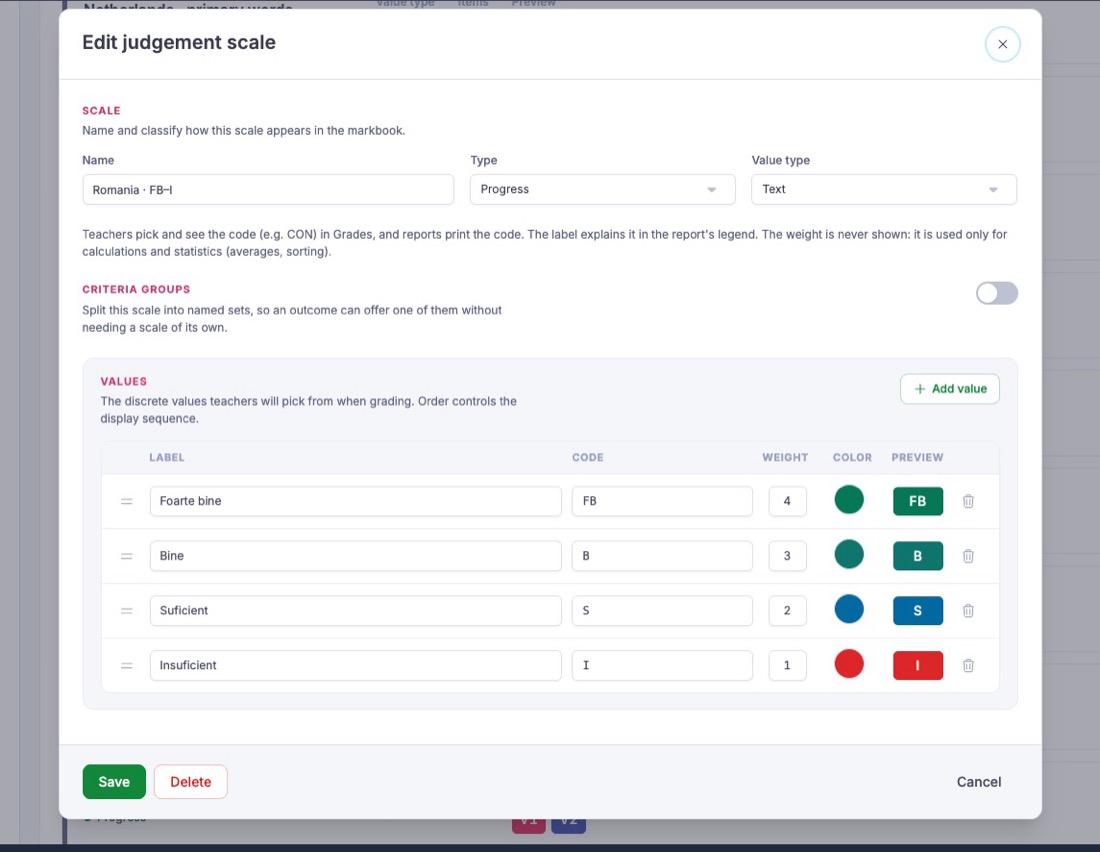
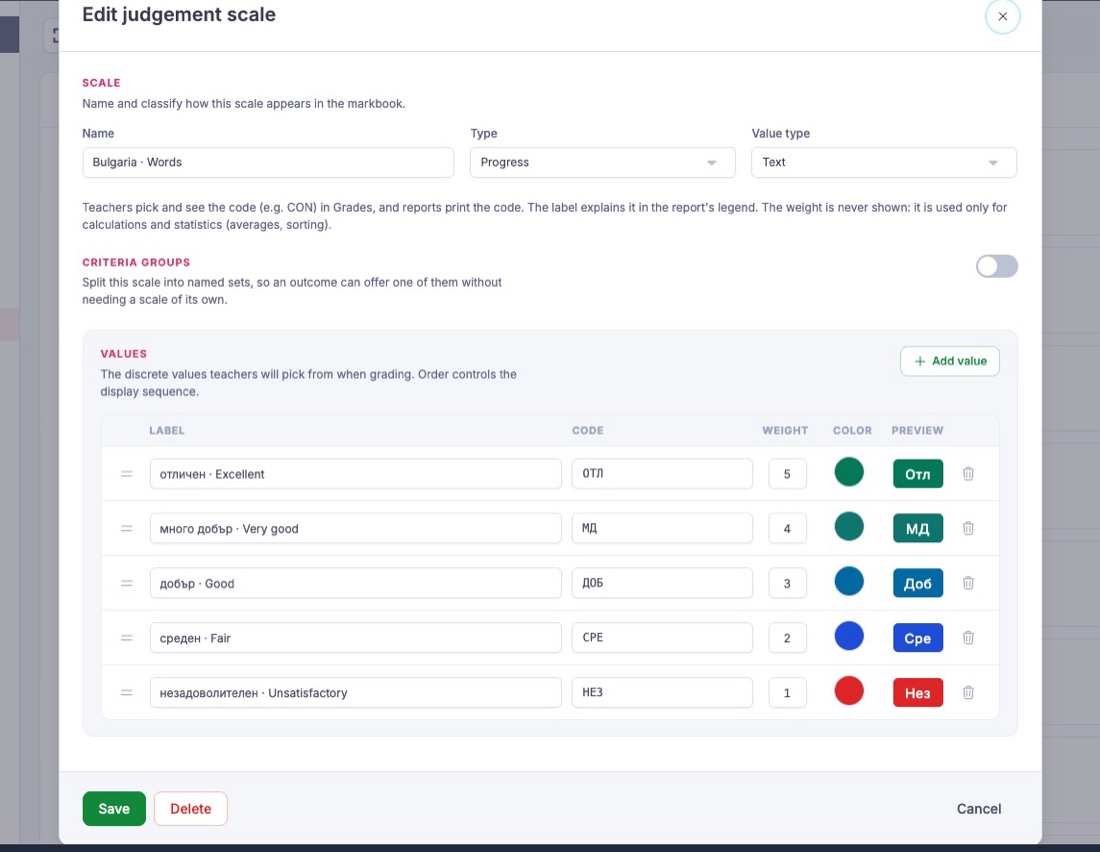
- Configuration → Assessment → Judgement scales → Add judgement scale. Value type Text.
- Add one value per word: Label the word, Code what the teacher writes (
FB,SB), Weight its order (4 for the best, 1 for the lowest). The weight orders the words; it is not shown.
 3. Create value types with Data type Judgement scale and this scale: one per assessment in the period, and one for the period result.
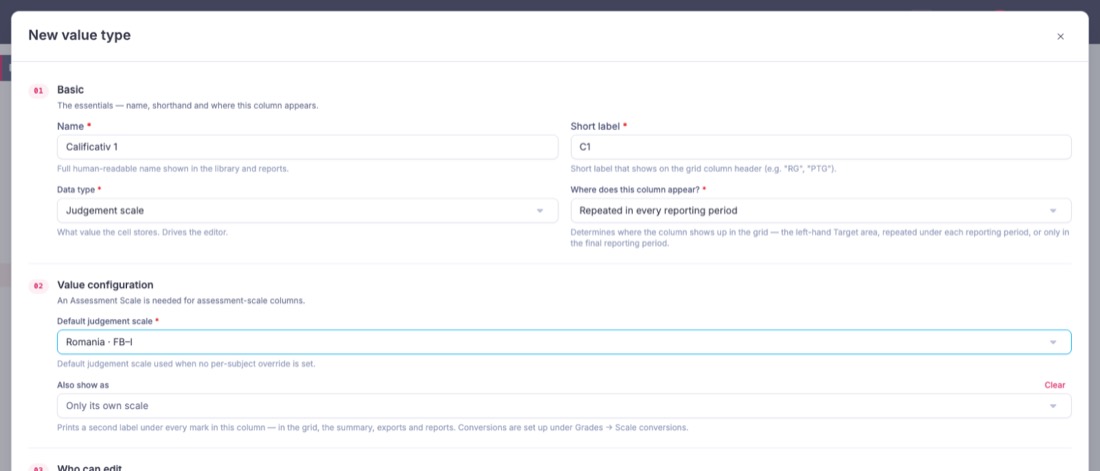 4. Let the teacher pick the period result. In most countries it is a judgement (Romania: one of the two words the pupil got most often), not an average, so it is not a calculated column.
Example. A Romanian teacher in year 3 records FB, B, FB, FB, B during the year and picks FB as the annual calificativ.
A written description only
For: the preparatory and first years in many countries: Romania's preparatory class, Poland years 1–3, Germany years 1–2, Hungary year 1, Serbia year 1, Sweden years 1–5, Norway and Denmark until year 7, Finland years 1–3 (often).
Add a Teacher Comment column (Data type Text) in each period, or only in the Final period when the report is written once a year. Name it as your country does: Raport de evaluare, ocena opisowa, Lernentwicklungsbericht. No scale is needed.
A wide range of points, a percentage or decimals
For: France and Greece 0–20, Portugal 0–20 in years 10–12, Cyprus 1–20, Luxembourg 1–60, Turkey 0–100, the Netherlands' 1–10 with one decimal, Spain's 0–10 averages, US percentages.
These do not fit an attainment scale: it holds at most 20 grades, and a 0–20 scale has 21. Use Number columns instead.
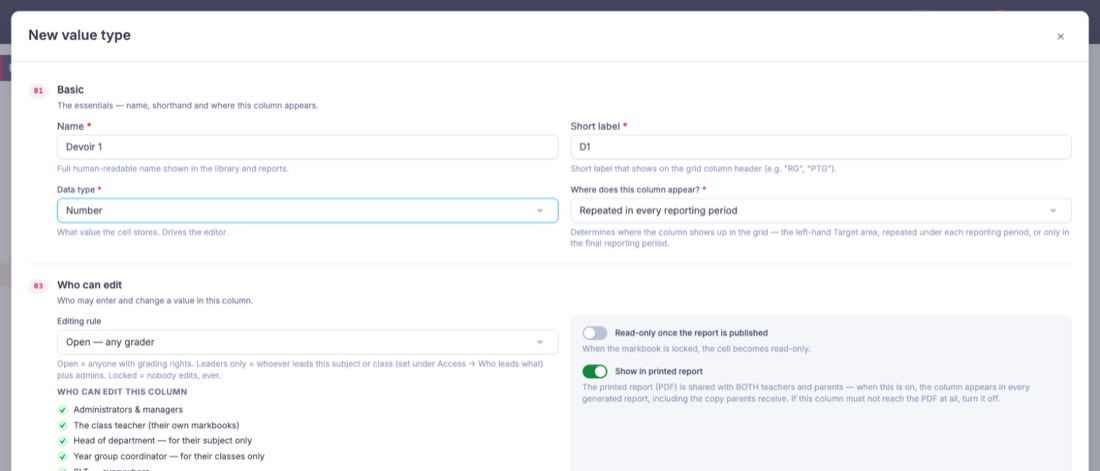
- Create value types with Data type Number, one per test or mark, Repeated in every reporting period. A Number column takes any value from 0 to 100, decimals included, so
13.5out of 20 and87out of 100 both fit.
 2. Add a Calculated period average, for example
round(avg(T1, T2, T3), 2). 3. Colour the result with Colour-code this column by its value: France, From empty Up to 10 in red, From 10 Up to empty in green.
A scale above 100 (England's KS2 scaled scores 80–120) does not fit a Number column. Record it as text in a comment column.
Letters
For: the US A–F (often with + and −), Sweden A–F, England's A-level A*–E, Wales and Northern Ireland A*–G, Cambridge IGCSE A*–G, Scotland's A–D, Greece A–D in years 3–4.
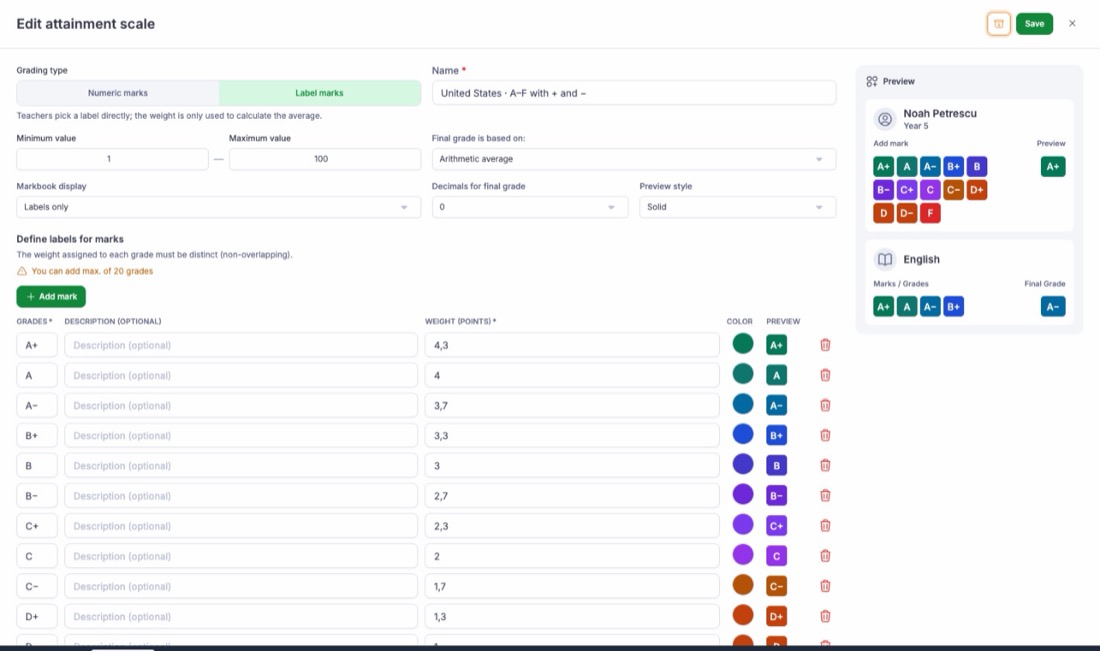
- Create an attainment scale with Label marks, one grade per letter, the best first.
- Give each letter a weight that orders it: US GPA points work well (
A4.0,A−3.7,B+3.3 …F0). A* must weigh more than A, or it sorts below it.
 3. To show a second scale beside the letter (a GPA, an old A*–G letter for a GCSE 9–1), add a scale conversion.
The school decides
For: Belgium (both communities), primary schools in the Netherlands, years 7–9 in England and Wales, Ireland's primary classes, many US elementary schools (standards-based 1–4).
There is no national scale, so build the one your school uses with the matching recipe above: numbers, words, points or letters. Write your scale's meaning in each grade's Description so a parent reading the report understands it.
Conduct and behaviour
Many countries grade conduct separately: Romania (1–10, below 6 repeats the year), Bulgaria, Poland (wzorowe to naganne), Hungary, Slovakia, Moldova. Make a judgement scale (words) or an attainment scale (numbers) for it, and put it on its own subject, for example Conduct, so the form teacher marks it once.
What MarkBook does not do
- No average across subjects. MarkBook does not work out an overall average of all subjects (Romania's media generală, Poland's średnia, a US GPA across courses). Use the subject results on the Summary or a report.
- No exam results from the state. National exam marks (Bacalaureat, Matura, Abitur, GCSE) are not imported. Add a Number or Grade label column if the school wants to record them.
- One rule per column. A rule that depends on something outside the marks (Romania's minus 1 conduct point for every 20 unjustified absences) is applied by the teacher, not by a formula.