
Choosing a grading system
Every country grades differently. A Romanian school gives calificative in primary and marks from 1 to 10 later, a Czech school gives 1 to 5 where 1 is the best mark, a French school marks out of 20, and a Swedish school writes letters from year 6. MarkBook has no built-in country mode. You build your system from a small set of parts, and the same parts fit every country.
This page explains those parts. Read it once, then:
- Find your country on Find Your Country. Its page shows the scale for each school year, every rule that matters (pass mark, averages, conduct, exams) and the national scales ready to copy, with a picture of each one.
- Follow the recipes on Set Up Any Grading System. Each recipe shows the exact screens, step by step.
For five countries there is also a full step-by-step guide: British (UK), American (US), Romanian, Polish and Bulgarian.
How a grading system fits together
A grading system in MarkBook has five parts. You make them in this order, because each one uses the one before it:
| Order | Part | What it answers | Where |
|---|---|---|---|
| 1 | Reporting periods | When are results closed? (semesters, terms, one year) | Configuration → School year |
| 2 | Scales | Which marks or words can a teacher give? | Configuration → Assessment → Attainment scales / Judgement scales |
| 3 | Columns (value types) | What does each cell of the grid hold? (a mark, a word, a number, a comment, an average) | Configuration → Assessment → Markbook Templates → Columns Configurations |
| 4 | Template | Which columns does each subject show, in which zone of the grid? | Configuration → Assessment → Markbook Templates |
| 5 | Formulas | How is an average or a final result worked out? | The template's Template settings tab |
Teachers then open Grades, pick a class and a subject, and type marks into the grid.
The building blocks
1. Attainment scales: grades with points
Configuration → Assessment → Attainment scales
An attainment scale is a list of grades. Each grade has a Grade label, an optional Description, a Weight (points) and a Color. The points are what MarkBook uses to average and sort. So "A*" can outrank "A", and "5+" can count as 5.5.
For every system on these pages, choose the Grading type Label marks. Teachers then pick a grade from the list in the grid. A scale holds at most 20 grades.
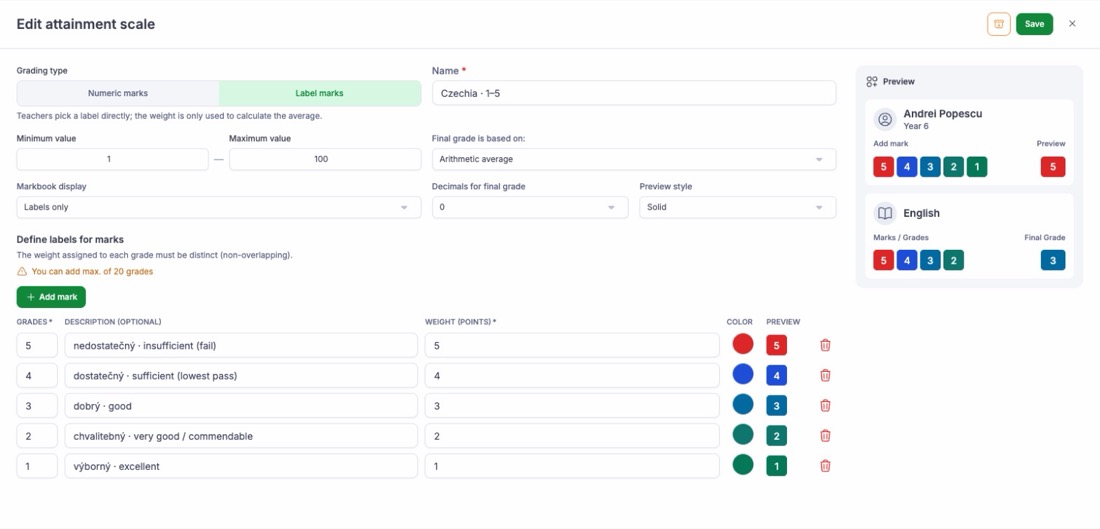
See Attainment Scales.
2. Judgement scales: a fixed list with no ranges
Configuration → Assessment → Judgement scales
A judgement scale is for effort, behaviour, attitude to learning or progress. Each value has a Label, and either a Code and a Weight (Value type Text) or a Numeric value (Value type Number).
- Text: the grid and the report show the code, for example "wz" for wzorowe.
- Number: the grid and the report show the number, for example "2" for an effort grade. The label explains it in the report's legend.
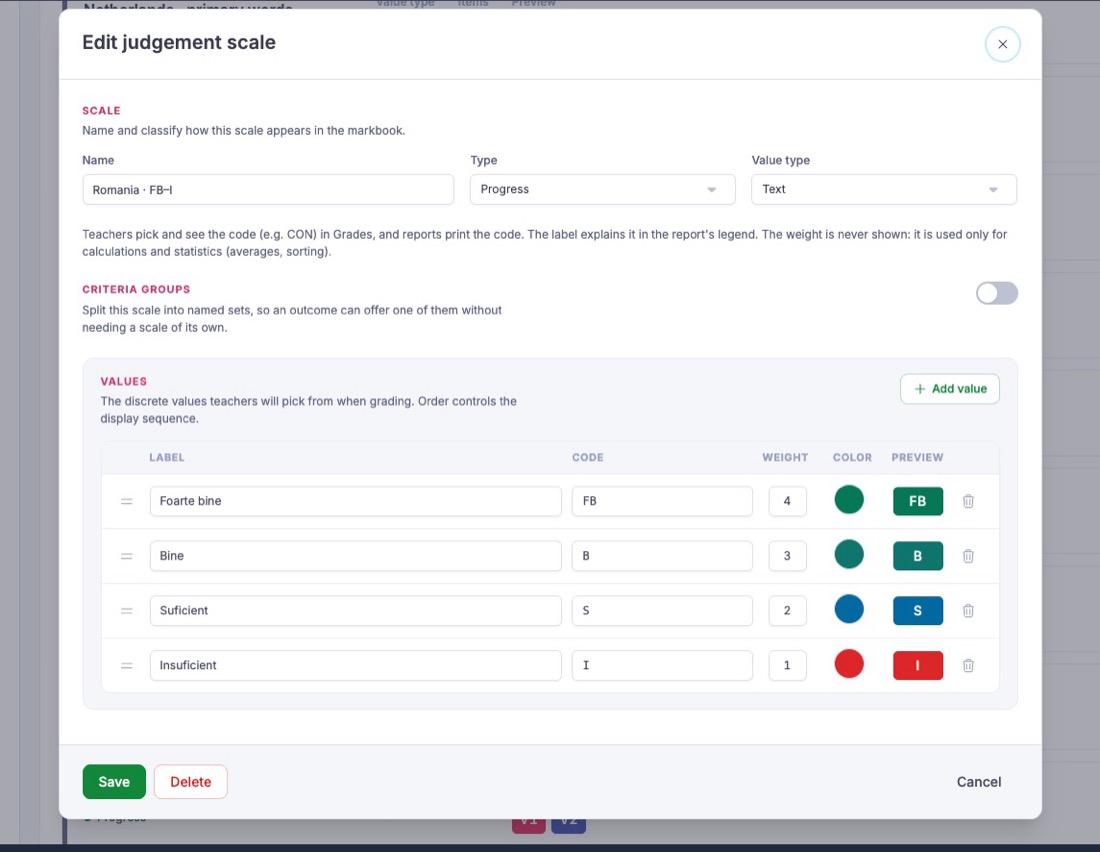
See Judgement Scales.
3. Columns (value types)
Configuration → Assessment → Markbook Templates → Columns Configurations
A column kind is a value type. Its Data type decides what a cell holds:
| Data type | What the teacher does | Use it for |
|---|---|---|
| Grade label | Picks a grade from an attainment scale | Note, oceny, GCSE grades, letter grades |
| Judgement scale | Picks a value from a judgement scale | Effort, behaviour, calificative |
| Number | Types a number from 0 to 100 | Raw test scores and percentages |
| Text | Types a comment | Teacher comments, descriptive grades |
| Yes / No | Ticks a box | Homework handed in |
| Calculated | Nothing; MarkBook works it out | Averages, value added |
Its Default scope (the question "Where does this column appear?") decides where it sits in the grid:
| Default scope | Grid zone | Example |
|---|---|---|
| Once per year — Target area | Target area, at the left | Target Grade |
| Repeated in every reporting period | Reporting period, under each term | Current Grade, a test |
| Only in the final reporting period | Final period | End of Year Grade, annual average |
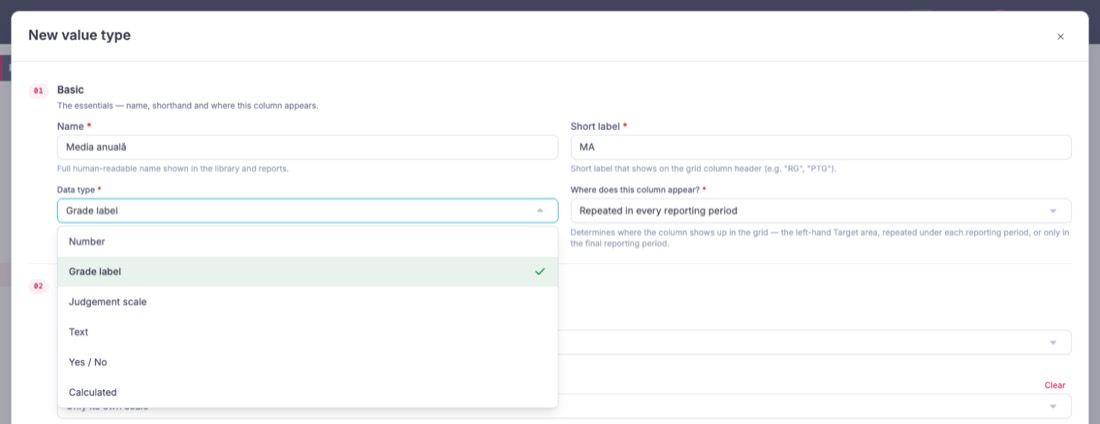
4. Reporting periods
Configuration → School year → Reporting periods
A term with dates is a span. A checkpoint inside it, with a due date, is where marks are entered. A term with no checkpoints is its own checkpoint. Columns repeat under each checkpoint. See Terms & Checkpoints.
5. Calculated columns
A calculated column has a formula, set per template on the Template settings tab. There are three tabs: Arithmetic, Weighted and Advanced. The Advanced tab takes an expression such as round(avg(N1, N2, N3)) and offers these functions:
| Function | Meaning |
|---|---|
avg(...) (also mean) | Average of the marks that exist. A missing mark is left out |
sum(...) | Sum of the values. Needs every value |
min(...) / max(...) | Lowest / highest of the marks that exist |
round(x) / round(x, 2) | Round to the nearest whole number / to 2 decimals |
floor(x) / ceil(x) | Round down / round up |
abs(x) | Distance from zero |
clamp(x, low, high) | Keep within a range |
You refer to a column by its Short label (for example N1). Put a label with spaces in square brackets: [End of Year Grade]. A grade-label column counts as its points; a judgement-scale column counts as its weight or number.
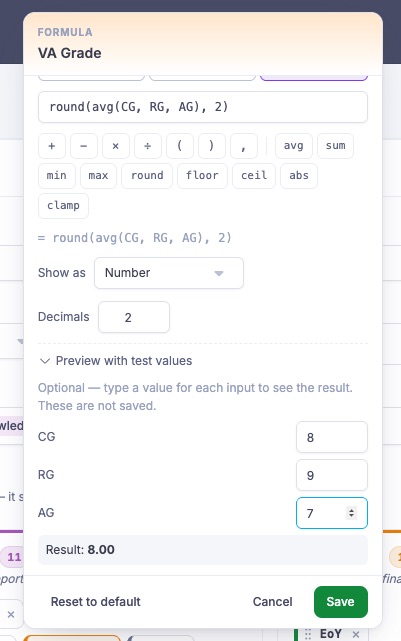
See Calculated Columns & Formulas and Weighted Averages & Final Grades.
6. Scale conversions and colours
- A scale conversion shows a mark in a second scale, for example an A–F letter with its GPA points, or a GCSE 9–1 grade with its old A*–G letter. See Scale Conversions.
- Conditional colours paint a Number or Calculated column by value, for example a Bulgarian average of 5.50 and above in green. See Conditional Colours.
Which setup wizard preset to start from
The Setup Wizard installs a grade scale, judgement scales, terms and columns in one go. On the Your school step, the Phase you tick decides the terms, columns and judgement scales. For the Secondary and High school phases, the Curriculum you choose decides the grade scale.
| Your system | Curriculum | Phase | Grade scale it installs | Then |
|---|---|---|---|---|
| British secondary | British | Secondary | British A*–U | Add a GCSE 9–1 scale |
| British primary | British | Primary | Below – Above expected | Rename to KS2 wording if you want |
| EYFS | Early Years Foundation Stage | Early Years | Emerging – Mastery | Add an Emerging / Expected scale for the ELGs |
| American | American | Secondary or High school | A–F | Add a +/− scale if you use one; choose Two semesters or Four quarters on the Terms step |
| Romanian | Romanian | Secondary or High school | Numeric 1–10 | Add grades 3, 2 and 1; choose Two semesters, then keep one period for the year (see Romanian) |
| Polish | Other or international | Secondary | British A*–U (replace it) | Build the 1–6 scale yourself; choose Two semesters |
| Bulgarian | Other or international | Secondary | British A*–U (replace it) | Build the 2–6 scale yourself; choose Two semesters |
The starting presets on the first step (British secondary, British primary, Early Years, Start from scratch) are all British in shape. For any other country, pick Start from scratch and answer the later steps for your country.
The wizard never deletes or overwrites. You can run it, then edit the scales by hand.
Limits to know before you build
Averages use the marks that exist
In the Advanced tab, avg(), min() and max() leave a missing mark out and work on the marks the pupil has. avg(N1, N2, N3, N4) with N3 empty is (N1 + N2 + N4) / 3. A missing mark is never a zero. If every mark the formula names is missing, the cell stays empty. The Weighted tab works the same way. Plain arithmetic (A - B, A * 0.4 + B * 0.6) and sum() still need every value, because a difference or a total with a part missing has no answer. To average marks where some may be missing, write avg(...) or use the Weighted tab, not (A + B + C) / 3.
An average now appears as soon as the first mark is in. Check how many marks a pupil has before you finalise. See Weighted Averages & Final Grades.
- A formula reads the same term. Inside a term,
N1means that term's N1. To combine two terms (an annual average), use one column per term. Set Up Any Grading System shows how. - A calculated column shows a number, with 0 to 4 decimals, or a signed number such as +2. It does not turn into a grade label. To show the grade as well, keep a grade-label column (for example Report Grade) beside it, or colour the number with conditional colours.
- Number columns accept 0 to 100. A value outside that range is refused. A KS2 scaled score (80–120) does not fit a Number column.
- No average across subjects. MarkBook does not currently work out a whole-school or all-subjects average (a medie generală, średnia ocen, общ успех or GPA across courses).